


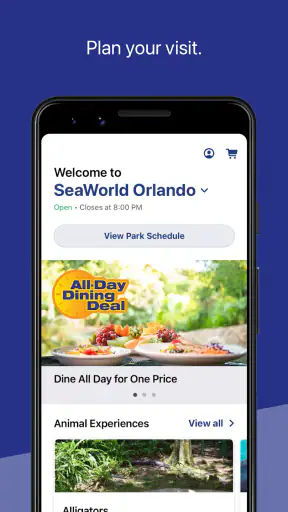
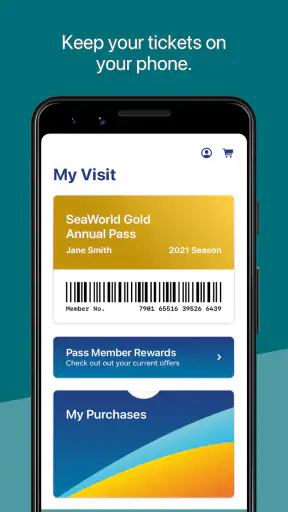
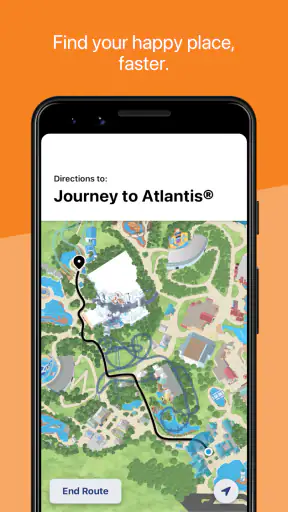
When I plan a SeaWorld visit, I would rather have the park’s practical information in one place than keep switching between a general map app, a browser, and a collection of screenshots. That is where SeaWorld makes sense. It is a free Travel & Local app from SeaWorld Parks & Entertainment Inc., built around maps, wait times, and park hours instead of trying to become a complete travel planner.
I tested it with the mindset of someone visiting with other people, because that is where a park app earns its place. A solo visitor can make quick decisions, but a household or group has to balance walking, food, attractions, breaks, and different energy levels. The app is most useful as a shared reference point for those decisions. It does not remove the need to talk with everyone, but it can reduce the small arguments caused by outdated assumptions about where something is or how long a queue might take.
The app has been available since April 14, 2011, and its current version is 7.1.63.140594. Its long presence and more than a million installs suggest that it is a familiar companion for visitors, while an average rating of 4.3 from roughly twelve thousand ratings gives it a generally positive reception. I would still treat it as a practical park tool rather than a reason by itself to choose a destination.
How SeaWorld Works When Several People Share the Day
The strongest use case is a group that needs a common view of the park. Before entering, one person can check the map and park hours while the others discuss priorities. Once inside, the same person can look at wait times before the group crosses the park for an attraction that may no longer be worth the walk. That sounds simple, but it changes the rhythm of a busy day: decisions become based on the current situation rather than on a plan made at breakfast.
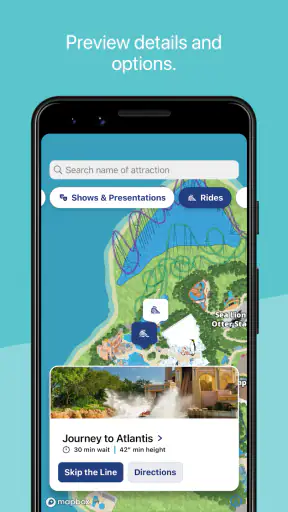
I found the map most valuable when the group’s interests were different. One person might want a major ride, another might care more about animals or presentations, and a younger visitor may need a break before anyone is ready to admit it. A map helps turn those competing wishes into a route. Instead of treating every request as a separate trip, I would look for nearby options and choose a reasonable next stop.
There is also a useful household habit here: keep one person responsible for the live information, but make the decision visible to everyone. The app does not need to become a private control panel held by the most confident member of the group. Showing the map and wait-time screen to children or relatives lets them understand why the plan is changing. That makes flexibility feel like coordination rather than a surprise cancellation.
For a shared device, the app is straightforward in concept. A parent can check it, hand the phone to another adult, and continue walking without needing a separate account for every person. I would not assume that everyone needs their own installation. The practical advantage comes from having one current reference, not from multiplying copies across the household.
That approach has a trade-off. If the phone owner is also taking photographs, navigating outside the park, and answering messages, the app may not be available at the exact moment someone asks for an update. A second adult can be useful as a backup, but the group should agree on who is checking information. Otherwise, the app is present but not actually part of the day’s coordination.
Planning the first hour without overplanning
Park visits often go wrong when the first hour is treated as a race. I would open the map and hours before leaving, identify the areas that matter most, and choose a loose starting direction. I would not build a minute-by-minute schedule from the app. Wait times move, people walk at different speeds, and a rigid route can make a leisure day feel like an appointment calendar.
A better workflow is to set one priority, one nearby alternative, and one low-pressure option. The priority might be an attraction the group would regret missing. The alternative could be another nearby experience if the queue becomes unattractive. The low-pressure option gives the group somewhere to go if a child needs a pause or an adult wants to stop making decisions. The map supports this method because it helps connect choices spatially rather than treating the park as a list.
Checking park hours before the visit is especially important for a household. People often assume that a familiar destination follows the same schedule every time, but the day’s available time affects transport, meals, and how much walking is sensible. I would check the hours again before leaving, then use them as a boundary for the plan rather than as a promise that every attraction will fit.
The app’s focus is narrow, and I consider that a benefit when I am already inside the park. I do not want a crowded screen filled with unrelated travel recommendations while trying to answer a quick question. On the other hand, someone arranging flights, hotels, restaurants outside the park, or a multi-day itinerary will still need other tools. A general maps service and a browser remain better for the complete trip around SeaWorld.
Setting boundaries on a shared phone
Household use works best when the phone’s role is agreed in advance. I would decide whether the device is mainly for the adult carrying tickets and directions, or whether children will also use it to choose the next stop. That is not a feature claim about the app; it is a sensible way to prevent a busy day from turning into a series of handoffs.
If a child is using the app, I would let them inspect the map and compare wait times while keeping the final route decision with the adults. A map can encourage independence without making a young visitor responsible for timing the entire group. This distinction matters because a short wait may still be unsuitable if the group has a meal, presentation, or accessibility need coming up.
The Everyone content rating makes the app comfortable to consider for a mixed-age household. Still, an age rating does not replace adult judgement about device use, wandering, or purchases elsewhere in the park. I would explain that the app is for information and planning, not permission to separate from the group. That conversation is more important than any setting on the phone.
I also recommend keeping expectations modest about personalisation. The app is useful for seeing the park’s information and making choices, but I would not treat it as a family scheduling system with individual profiles, private plans, or household task assignments. If your group needs those things, a shared notes app or messaging thread can sit alongside it. SeaWorld handles the park view; the household still handles its own agreements.
Using wait times as guidance rather than a guarantee
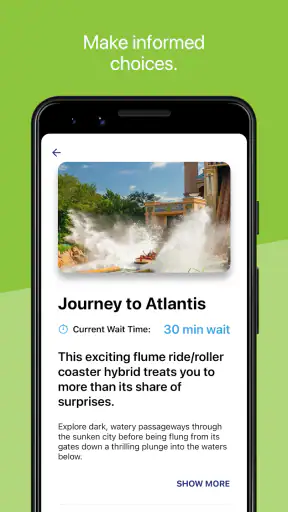
Wait times are the feature most likely to influence a decision, and also the one I would use with the most caution. A displayed estimate can help compare two options, but it should not be treated as a precise appointment. Lines change, loading conditions change, and the time needed to reach an attraction is part of the real cost.
My practical rule is to compare wait time with walking distance and group energy. A slightly longer queue nearby may be better than a shorter queue across the park if the group has already spent the morning walking. Conversely, a longer route can make sense if it moves everyone toward the next area they want to visit. The app provides the information; the useful judgement comes from combining it with the map.
This is one of the less obvious strengths of using the two tools together. A wait-time screen by itself encourages queue shopping. A map by itself encourages route planning without knowing whether the destination is busy. Looking at both prevents a common mistake: crossing the park for a number that looks attractive but produces no real saving after the walk.
For families, I would also use wait times to protect breaks. If a young child has just finished an attraction, the best next move may not be the shortest available queue. A shaded pause, food stop, or calmer area can preserve the rest of the day. The app cannot judge fatigue, so the adult coordinating the group has to resist the temptation to fill every low-wait moment.
Keeping plans coordinated when people split briefly
There are times when a group needs to divide temporarily. One adult may take a tired child for a break while others continue, or two visitors may choose different attractions. SeaWorld can help each person understand the park layout, but I would not rely on it as a substitute for a meeting plan. Agree on a recognizable meeting point and a time window before separating.
This is another reason I prefer a shared-device approach with clear responsibility. If everyone is checking different screens and making independent changes, the group can lose track of its plan. The app is better at showing information than at managing people. Use it to agree on the next location, then use ordinary communication to confirm that everyone understands.
When rejoining, the map is useful for estimating which direction each person should take. I would still allow extra time because the shortest-looking route may not feel shortest with a stroller, a tired child, or a group moving slowly. A digital map gives orientation, not a guarantee of effortless walking.
For visitors who dislike constant phone use, one person can check the app at natural decision points: before entering an area, after an attraction, and when the group needs a new plan. There is no need to stare at it continuously. That rhythm preserves the experience while still taking advantage of current park information.
What the app means for trust and age
Because the app is rated for Everyone, I see it as suitable for a household where children may look at the map or help compare choices. Its value for younger users is educational in a modest, practical way: they can see that a park has areas, distances, and changing queues. That can make planning less abstract than simply being told where to go.
However, I would avoid giving a child the impression that the app can answer every safety question. It does not replace an adult’s awareness of the group, the surroundings, or the child’s needs. A map can show where something is, but it cannot decide whether a child is ready for a long walk or whether the group should stay together.
Older children and teenagers may appreciate having a clearer role. An adult can ask them to check the next area and report back, while still agreeing on boundaries for movement. This turns the phone into a coordination aid rather than a source of conflict. The important part is that responsibility grows gradually and remains connected to the group’s plan.
I would also be careful with trust around information. If a child says the wait is short, I would look at the screen together rather than assuming they are wrong or right. That small habit teaches everyone that the app is a live reference, not an authority that ends the conversation. It also reduces the chance of a disappointed child feeling blamed when the situation changes.
For adults sharing the phone, the same principle applies. One person may be more comfortable with maps, while another is better at keeping the group on schedule. The app does not require those roles to be identical. In my view, the best household arrangement is to let one adult handle the screen while another handles the human side of the plan.
Where it beats general travel alternatives
Compared with a general maps app, SeaWorld is more directly useful once the visit is underway. A general map may help with roads, hotels, and the route to the destination, but it is not the natural place to check park hours and attraction wait times together. The dedicated app reduces the number of separate searches needed for those park-specific decisions.
Compared with paper maps, it has the advantage of being easier to consult when the group changes direction. A printed map can still be useful as a backup, especially if the phone battery is low or several people need to look at the layout at once. I would not discard that backup simply because the app is convenient.
Compared with a browser search, the app feels better suited to repeated checking during the day. Opening a dedicated tool is less distracting than sorting through search results, and the information is presented in the context of a park visit. The limitation is that the app is not a universal trip organizer. For transport, nearby businesses, and plans beyond the park, the browser or a broad travel app remains more capable.
That distinction helps clarify who should skip it. If you are only researching whether SeaWorld fits into a wider holiday, the app may be less useful than general travel tools until your visit becomes definite. If you are already going and want current park-oriented information in your pocket, its focused design is much easier to justify.
Small frictions that affect a real visit
The first friction is dependence on the phone. A park day can be long, and repeated map checks may compete with photography, messages, and other battery-heavy activities. I would start with a charged device and avoid unnecessary browsing. The app is free, but the phone that runs it still has practical limits.
The second is the danger of overconfidence. A neat map and a current-looking wait time can make a plan feel more certain than it is. I would always leave room for walking, meals, rest, and unexpected changes. The app improves decisions; it does not make the park predictable.
The third is group disagreement. Having the same information does not mean everyone wants the same thing. A child may prefer a nearby experience, an adult may be focused on a priority attraction, and another visitor may simply need to sit down. The app can expose the trade-off, but it cannot resolve it. That is why I value its role as a conversation starter rather than a decision-maker.
There is also a learning curve for anyone who rarely uses park apps. The core idea is simple, but a first-time visitor may still need a few minutes to understand how the map relates to the physical layout. I would explore it before entering rather than waiting until the group is standing in a crowded area asking for directions.
Who gets the most value from it
I would recommend SeaWorld most strongly to visitors who expect to make several decisions during the day. Families with children, couples with different priorities, and groups trying to avoid unnecessary walking all benefit from having park hours, maps, and wait times close together. It is also useful for a visitor who prefers flexible planning but still wants enough information to change direction intelligently.
It is less compelling for someone who has no interest in checking a phone during the visit. If your plan is to arrive, follow a fixed route, and ignore live information, the app may add little. It is also not the right replacement for accessibility planning, personal medical preparation, transport research, or a detailed itinerary outside the park. Those needs require additional preparation.
For a household, I would install it on the device that will actually be carried throughout the day, then decide who will check it and how the group will communicate changes. I would review park hours before leaving, use the map to create a loose starting plan, and treat wait times as comparisons rather than promises. Those three habits make a bigger difference than simply downloading the app and hoping it organizes the day automatically.
The app is free, which removes the main barrier to trying it, and its Everyone rating makes it an easy candidate for a shared family device. Its audience is broad, but its usefulness still depends on the visit itself. Someone planning a complete holiday will need more than this focused tool, while someone standing inside the park may find the focus exactly right.
My household verdict
After using it as a visitor’s planning companion, I see SeaWorld as a practical app with a clear job. It brings together the information I am most likely to need while moving through the park, and it becomes more valuable when several people have to agree on what happens next. The map and wait-time combination is especially helpful because it connects distance with queue decisions instead of presenting either one in isolation.
I would not describe it as a complete family organizer, a replacement for communication, or a guarantee that the day will run smoothly. Its limitations are tied to its focus: it helps with the park’s layout, timing, and hours, while adults still manage boundaries, trust, energy, meeting points, and priorities. That is a fair trade-off for an app that stays centered on the visit.
With an average rating of 4.3 and roughly three thousand written reviews, it has earned a solid response from a substantial user base. I would recommend it to anyone visiting SeaWorld who wants a flexible plan and expects to make decisions on the move. My strongest advice is to use it lightly but deliberately: check before committing to a long walk, involve the household in the choice, and keep a human plan alongside the digital one. Used that way, this free Travel & Local app can make a crowded park day feel noticeably more manageable.


